

Set Your Parameters Before You Search
Before you open any flight search tool, do the groundwork that most beginners skip. Knowing your constraints - and which ones you can flex - directly determines how much room you have to find a lower price.
Start with three questions: What is your absolute travel window? Which airports can you realistically use? And what is your true all-in budget, including bags and ground transport from whichever airport you choose?
A wider travel window is the single most effective lever available to a budget traveler. Even shifting departure by two or three days can move a fare considerably. Midweek departures (Tuesday, Wednesday) and early-morning or late-night flights are structurally less popular and often priced lower as a result.
Before your first search, run through the checklist in our pre-booking checklist - it covers documents, budget constraints, and route options that can prevent costly oversights later.
Fare class
An alphabetical code assigned to a ticket that sets its price, refund and change rules, and mileage earning - separate from which cabin (economy, business) you sit in.
Basic economy
A stripped-down fare tier offered by many major airlines that typically prohibits seat selection, changes, and sometimes carry-on bags in exchange for a lower base price.
Fare alert
An automated notification from a flight search tool that tells you when the price for a specific route and date has changed, so you don't have to check manually.
Dynamic pricing
A pricing model in which airlines adjust fares in real time based on seat availability, demand, and competitor pricing rather than publishing fixed prices.
All-in price
The true total cost of a flight after adding the base fare, taxes, baggage fees, seat selection, and any other applicable charges.
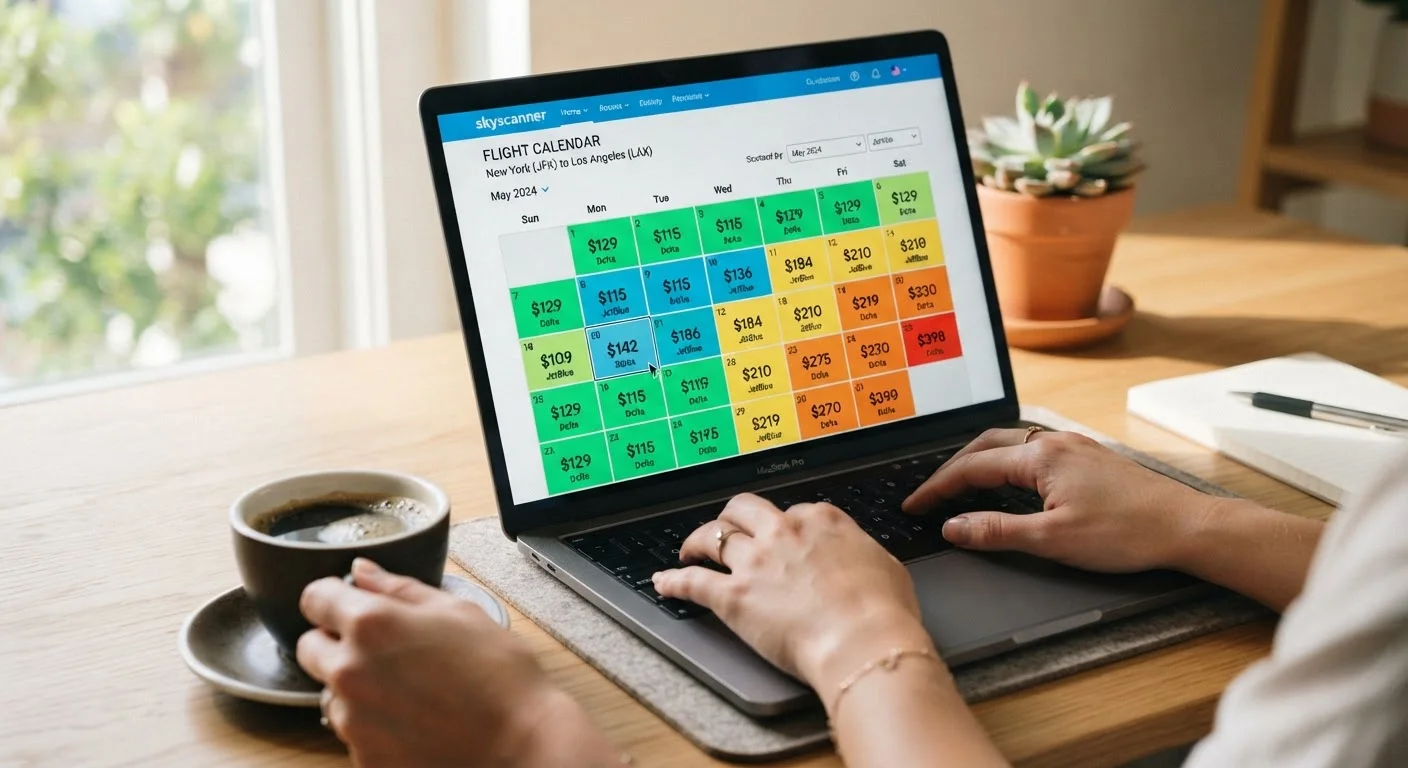
Calendar view
A display feature on flight search tools that shows the lowest available fare for each day of a month, letting you compare dates at a glance.
Understanding Fare Classes and How Pricing Works
Airlines sell seats through a tiered inventory system called fare classes - alphabetical codes (Y, B, M, Q, and many others) that define the price, flexibility, and earning potential of each ticket. A single economy cabin may contain a dozen different fare classes simultaneously, each with its own rules.
What this means practically: two passengers sitting next to each other in economy may have paid very different prices and have completely different change and refund rights. The cheapest economy fare classes are typically non-refundable, non-changeable (or carry steep change fees), and earn fewer frequent-flyer miles.
Airline pricing is also dynamic. Carriers adjust fares in real time based on remaining seat inventory, competitor pricing, and demand signals. This is why prices fluctuate between searches and why acting on a solid fare - once you've confirmed it's reasonable - is sensible.
Check the fare rules before you buy
Before completing any purchase, locate the fare rules link on the booking page - it spells out change fees, refund eligibility, and any restrictions. A fare that looks flexible in the headline may be entirely non-refundable in the fine print. Spending 60 seconds on this step can save significant money if your plans shift.
Using Flexible Date and Destination Tools
Most major flight search platforms offer tools that let you view fares across an entire month or across multiple destinations simultaneously. These are among the most underused features available to budget travelers.
A calendar view or price grid displays the lowest available fare for each departure date in a given month, letting you identify the cheapest days at a glance rather than testing dates one by one. A map or explore view shows fares to multiple destinations from your origin simultaneously - useful if your destination is genuinely flexible.
Fare alert tools are worth activating once you identify a route. They monitor the price and notify you of significant changes, removing the need for daily manual checks. Set alerts for both your preferred dates and a ±3-day window around them.
For a broader strategy on timing and search approach, see our complete guide to finding cheap flights.
Evaluating Results and Avoiding Hidden Fees
Raw fare prices are rarely the full story, especially on budget carriers. Before comparing any two results, calculate the total cost by adding every applicable fee.
- Baggage: Many low-cost fares exclude even a carry-on bag. Know the carrier's bag policy before assuming the advertised price is final.
- Seat selection: Basic economy fares often assign seats at check-in unless you pay to select one in advance.
- Payment fees: Some carriers charge a processing fee for credit card payments.
- Airport check-in fees: A handful of budget airlines charge for printing boarding passes at the airport.
Also look at layover duration and airport location. A one-stop itinerary with a 90-minute connection at a large hub carries meaningful missed-connection risk. An itinerary routing through a secondary airport may require expensive ground transport that offsets the savings.
Our practical booking walkthrough goes deeper on fee traps and how to sidestep them.
Budget fares often cost more once fees are added
A base fare from a budget carrier can appear dramatically lower than a legacy airline's price - until you price in a carry-on bag, seat assignment, and payment fee. Always build out the full cost for each option before deciding. On short routes especially, the gap between advertised and actual cost can flip which option is genuinely cheaper.
From Search to Confirmed Booking
Once you've identified a fare that holds up under total-cost scrutiny, move to booking with a clear head rather than urgency. Fares do change, but manufactured urgency - countdown timers, low-seat warnings - is a common design pattern, not always a reliable signal of actual scarcity.
Decide whether to book through an aggregator or directly with the airline. Aggregators are efficient for comparison but can complicate service requests if you need to change or cancel. Booking directly with the carrier keeps you closer to the source for schedule changes and rebooking options.
Screenshot or save your itinerary details - including the fare class code if visible - before completing payment. After booking, check the confirmation email immediately for accuracy: names must match your government ID exactly.
For a complete decision framework covering timing, tools, and the final booking steps, see our flight booking strategy guide. The Booking & Timing Tips hub also collects related guides as your search strategy matures.