

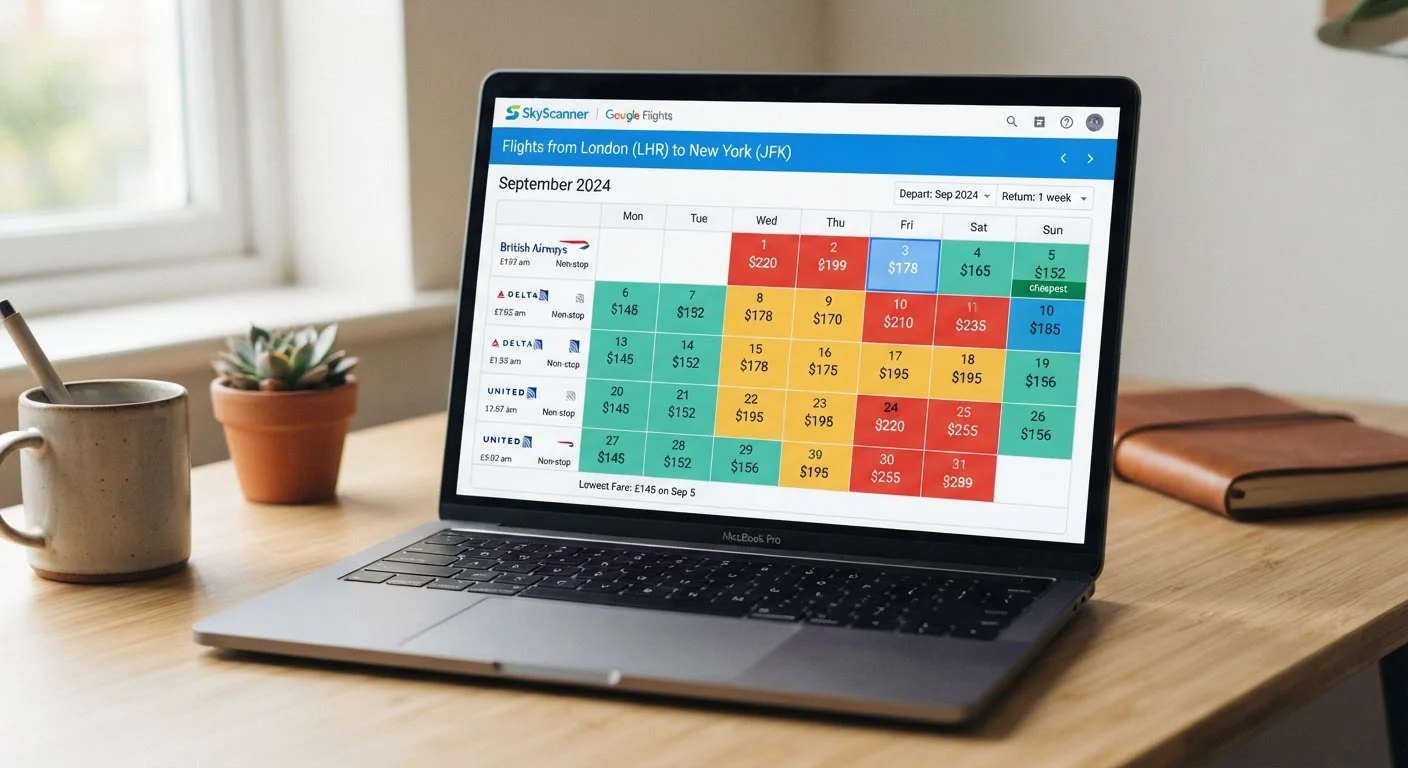
What a Fare Calendar Is - and What It Is Not
A fare calendar is a date grid that surfaces the lowest available advertised price for each day across a selected route. It is a snapshot, not a forecast, and it reflects only the fare classes that have remaining inventory at the moment the data was pulled. Understanding this distinction matters because many travelers treat the calendar as a reliable map of cheap and expensive days - when it is more accurately a partial, time-stamped picture of current seat availability.
Fare calendars are genuinely useful for one narrow purpose: quickly identifying which days within a broad travel window are currently pricing lower than others. They are not reliable tools for predicting whether prices will rise or fall, for comparing routes across different carriers side-by-side, or for confirming that a low figure is still available when you return to book. For context on the broader forces that push fares up and down, see why flight prices change so unpredictably.
Calendar Prices Are Not Guaranteed Fares
The figure shown on any given date is the lowest fare currently available in that fare class - it can sell out before you complete checkout. Prices also fluctuate based on demand, time of search, and seat inventory. Never treat a calendar number as a locked-in price until you have a confirmed booking.
How to Read the Calendar Without Being Misled
The most common misreading of a fare calendar is treating a displayed price as the final, all-in cost. This is rarely accurate. Taxes and carrier surcharges can add a fixed amount to any base fare regardless of the date - meaning a date that looks 20% cheaper on the calendar may deliver only a 10% saving at checkout once fixed charges are added back equally across all options.
Base Fare vs. Total Price: A Critical Difference
Many fare calendars display base fares that exclude airport taxes, carrier-imposed surcharges, and fees for checked bags or seat selection. The gap between a calendar's displayed figure and your checkout total can be substantial - sometimes exceeding 30-40% on short-haul routes or budget carriers. Always click through to the full fare breakdown before drawing any conclusions.
A second common error is ignoring route and stop differences between dates. The cheapest day in the calendar may reflect a routing with a long layover or an additional connection - conditions that don't apply to the pricier dates. Always confirm that the itinerary behind the low-priced cell is genuinely comparable to alternatives. Budget carrier pricing adds another layer of complexity; how budget carriers structure their pricing explains how base fares and add-ons interact.
Use Flexible-Date Views Strategically
Most fare calendars let you toggle between a monthly grid and a flexible ±3-day view. Use the monthly grid first to identify the cheapest week, then switch to the flexible view to pinpoint the single cheapest day within that window. This two-pass approach is faster and less error-prone than scanning the full month date by date.
Finally, use the calendar in combination with the tools and steps below - not as a standalone decision-making instrument.
What you will need
Airline direct website fare calendar
Shows the carrier's own pricing grid, typically with the most accurate seat availability for that airline.
Third-party flight search fare calendar
Aggregates prices across multiple airlines into a single grid for quick cross-carrier comparison.
Spreadsheet or notes app
Records candidate dates and prices across different tools so you can compare without relying on memory.
Set your origin, destination, and cabin class before opening the calendar
Before the calendar grid loads, confirm you have selected the correct origin and destination airport codes, the right cabin class (economy, premium economy, business), and whether you need a one-way or round-trip view. Changing any of these parameters after you start reading the grid resets the data and forces you to re-scan from scratch.
Understand what the displayed price actually includes
Each cell in the fare calendar shows the lowest fare found for that specific date - but the definition of 'lowest fare' varies by platform. Some calendars show the all-in price including taxes; others show only the base fare. Look for a label near the calendar header (often a small asterisk or footnote) that clarifies whether the figure is 'from' pricing, base-only, or taxes-included. If you cannot find this label, click through to any date's result and compare the calendar figure against the itemised checkout total to establish the difference. For a full breakdown of what fare components look like at checkout, see decoding flight search results.
Read the color coding and price tiers correctly
Most fare calendars use a color gradient - commonly green for lower prices through to red or grey for higher prices - to signal relative cost within the displayed date range. These colors are relative, not absolute: a green cell on a peak-season calendar may still be more expensive than a red cell on an off-peak calendar. Use color to identify the cheapest days within your current search window, not to judge whether those prices are cheap in a broader sense.
Check seat availability behind the displayed price
A fare calendar shows you the price of the cheapest available fare class on each date - not how many seats remain at that price. A date showing a low figure might have only one or two seats left in that fare bucket. Click through to the actual flight results and look for availability indicators (some platforms show the number of seats remaining at the displayed price). If you see 'only 1 seat left at this price,' treat that calendar figure as unreliable for planning purposes. Fare bucket terminology explains how airlines segment seat inventory across price tiers.
Cross-reference at least one other source before deciding
No single fare calendar has complete market coverage. An airline's own calendar shows only its inventory; third-party calendars may cache prices that are minutes or hours old. After identifying your target dates on one calendar, open a second source - ideally the airline's direct site if you started on an aggregator, or vice versa - and verify the price. Note any discrepancy. If the figures align, you have reasonable confidence the price is current. For a structured look at how different fare-tracking tools compare, see fare alerts and price trackers.